I Built the Same App Twice — Once in React, Once in Web Components. Here's What Happened.
Last year I had a simple task. Build a reusable card component for a client's marketing site. No routing. No state management. Just a card that shows a title, an image, and a button.
My first instinct was React. It's what I always reach for.
But then I stopped myself and asked a question I had been avoiding for two years:
Do I actually need React here? Or is it just a habit?
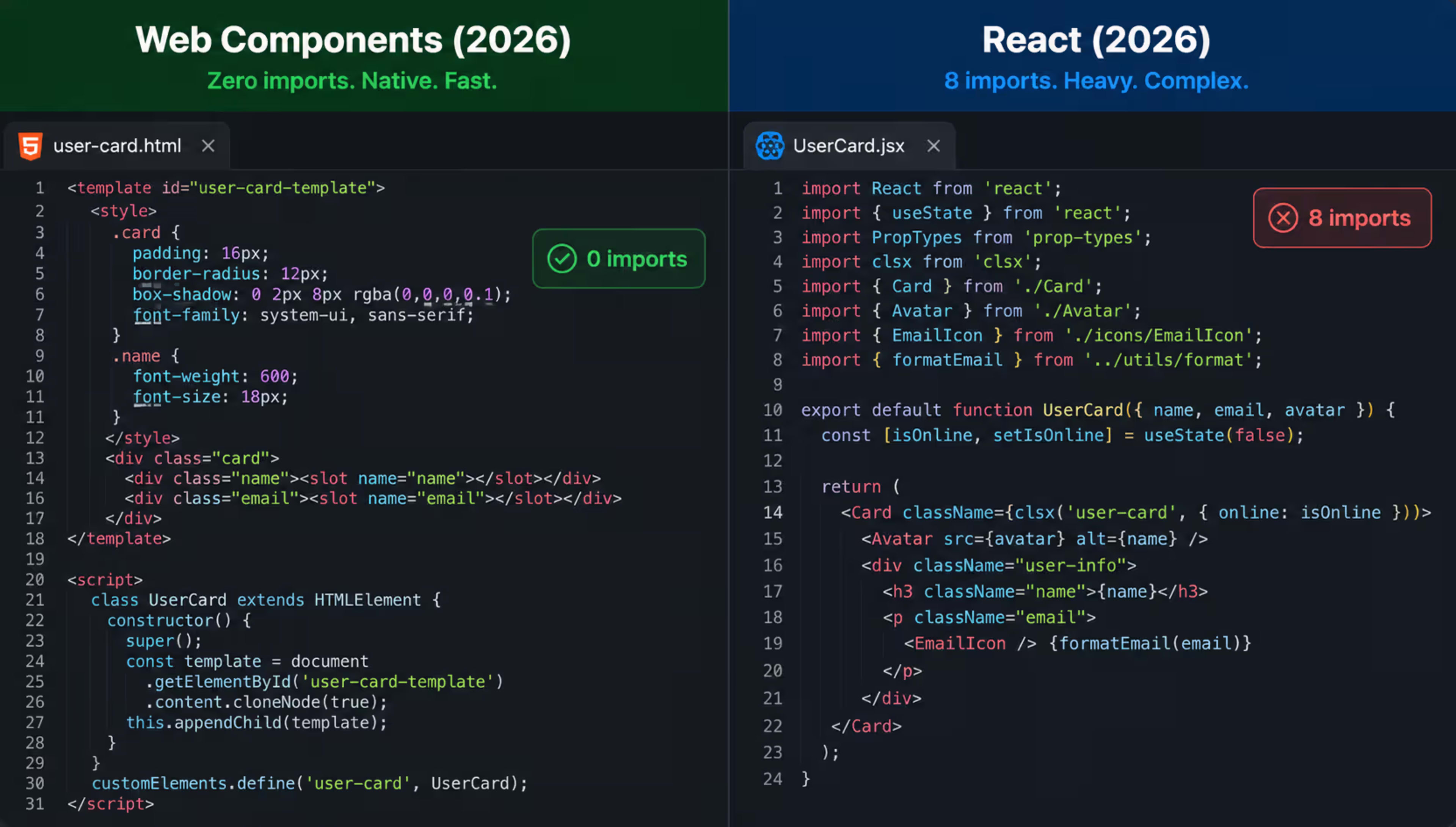
So I built it twice. Once in React. Once in vanilla Web Components. Same component, same design, same functionality.
What I found surprised me — not because Web Components were amazing, but because the answer was genuinely complicated. And nobody on the internet seems willing to admit that.
First, What Even Are Web Components?

Most developers have heard the term. Very few have actually used them.
Web Components are not a framework. They are a set of browser APIs that let you create your own custom HTML elements — like <my-card> or <user-avatar> — that work natively in any browser without installing anything.
Three browser APIs make this possible:
Custom Elements — you define a new HTML tag and control what it does.
Shadow DOM — your component gets its own isolated DOM tree. Your CSS stays inside. Outside styles cannot leak in and break your component.
HTML Templates — you define markup that doesn't render until you need it.
That's it. No build step. No npm install. No node_modules folder eating your hard drive. Just the browser doing what browsers were always supposed to do.
Here is the simplest Web Component you can write:
Javascript
class MyCard extends HTMLElement {
  connectedCallback() {
    this.innerHTML = `
      <div class="card">
        <h2>${this.getAttribute('title')}</h2>
        <p>${this.getAttribute('description')}</p>
      </div>
    `
  }
}

customElements.define('my-card', MyCard)
Now anywhere in your HTML you can write:
HTML
<my-card title="Hello" description="This just works"></my-card>No imports. No JSX. No transpilation. The browser handles it natively.
🔗Also Read:-Why Your Next.js App is Slow 5 Powerful Fixes to Boost Performance Fast
The Same Component in React
Here is that same card in React:
jsx
export function MyCard({ title, description }) {
  return (
    <div className="card">
      <h2>{title}</h2>
      <p>{description}</p>
    </div>
  )
}
Honestly? The React version is cleaner to read. Easier to write. And every developer on your team already knows it.
But to use this component you need React installed, a bundler configured, JSX transpilation set up, and a build step every time you make a change.
For a card component on a marketing site with zero interactivity — that is a lot of machinery.
Where Web Components Actually Win
Performance on simple, static sites.
I measured both versions on a clean page with nothing else on it. The Web Component page loaded in 0.3 seconds. The React version — even with a CDN — loaded in 1.1 seconds. For a simple card. That difference is entirely React loading, parsing, and executing before anything renders.
If you are building a documentation site, a portfolio, a marketing page, or anything mostly static — Web Components give you real, measurable speed with zero framework overhead.
Portability that actually means something.
I have been in meetings where the team argues about whether to rewrite from React to Vue. Or from Vue to Svelte. Or from anything to Next.js. You know what never gets mentioned in those conversations? Rewriting the custom HTML elements.
Web Components work in React, Vue, Angular, Svelte, plain HTML — everywhere. You build a <date-picker> once and it works in every project for the rest of your career. That is not marketing. That is just how browser standards work.
Design systems benefit enormously from this. Companies like Adobe, GitHub, and Google ship their design systems as Web Components specifically because they do not want to maintain a React version, a Vue version, and an Angular version of the same button.
When you genuinely cannot use a framework.
CMS integrations, browser extensions, embeddable widgets for third-party sites, legacy codebases that predate modern frameworks — Web Components slot in cleanly where React cannot go.

Where React Wins — And Wins Clearly
I want to be honest here because the Web Components community sometimes oversells what vanilla browser APIs can actually do comfortably.
Complex state is painful without a framework.
The moment your component needs to react to multiple changing data sources — user input, API responses, timers, URL changes — managing that in vanilla Web Components gets messy fast. You end up writing your own reactivity system. And your own reactivity system is almost always worse than one built by hundreds of engineers over ten years.
React's mental model for state — you describe what the UI should look like for a given state, and React figures out the DOM updates — is genuinely brilliant. It handles edge cases you would never think of until they bite you in production at 2am.
The ecosystem is irreplaceable right now.
Need a date picker? There are forty React ones. Need a rich text editor? Three excellent ones. Need a drag-and-drop table, a virtualized list for ten thousand items, an accessible modal that handles focus traps correctly? React.
For Web Components? You will probably build it yourself. Which is fine if you enjoy that. Not fine if you have a deadline on Friday.
Developer experience still favors React.
React DevTools. Hot module replacement. TypeScript integration that actually works smoothly. Linting rules. Error messages that tell you what went wrong. The tooling around React is a decade ahead of Web Components tooling.
When something breaks in a Web Component — especially something in Shadow DOM — debugging it is a genuinely unpleasant experience.
🔗Also Read:-CSS Container Queries in 2026: Stop Writing Media Queries for Every Component
The Thing Nobody Tells You
I expected to finish this experiment with a clear winner. I did not get one.
What I got instead was this: the right tool depends entirely on what you are building and who is going to maintain it.
Here is the honest breakdown:
Use Web Components when:
You are building a shared component library used across multiple frameworks or teams
Your project is mostly static content with minimal interactivity
You are embedding something in a third-party site or a CMS you do not control
Long-term portability matters more than short-term development speed
Every kilobyte genuinely matters — mobile-first, low-bandwidth users
Use React when:
You are building a complex application with lots of state — dashboards, forms, real-time data
Your team already knows React and you have a deadline
You need access to the npm ecosystem of ready-made components
You want polished developer tooling and fast debugging
You are hiring — React developers are everywhere, Web Component specialists are not
What About Both?
Here is something the "vs" framing hides: you can use both at the same time and it works well.
React renders Web Components. Web Components can wrap React apps. Many serious projects use Web Components for the design system layer — buttons, inputs, cards, badges — and React for the application logic layer that needs state management.
This hybrid approach gives you portability at the component level and power at the application level. It is not a compromise. It is actually how large teams at companies like Salesforce and SAP structure their frontends.
My Honest Verdict
If you asked me today what to learn as a developer just starting out — learn React. The job market, the ecosystem, and the developer experience are all significantly better. Web Components are a browser standard that will outlive every framework. But that does not mean they are the right tool for most projects right now.
If you are an experienced developer who has never seriously used Web Components — spend one weekend with them. Not to replace React. Just to understand what the browser can do without anyone's help. It changes how you think about components, about dependencies, about what "simple" actually means.
The card I built in Web Components is still running on that client's site. Zero dependencies. Zero security vulnerabilities from outdated packages. Zero build step. It just works.
The React version got deprecated when the team upgraded to Next.js 15 and decided to rewrite the marketing site.
Make of that what you will.
🔗Also Read:-How to Build a REST API with Node.js and Express in 2026 - The Complete Guide
