
Introduction to Next.js 14 Architecture
Next.js 14 has changed the way developers build web applications. If you’re trying to understand Next.js 14 Explained: How to Choose Between Client and Server Components, you’re in the right place. This guide will walk you through everything in a simple, practical way.
With the introduction of React Server Components, Next.js now allows developers to decide where code runs — on the server or the browser. This decision directly affects performance, SEO, and user experience.
Evolution from Next.js 12 to 14
Earlier versions of Next.js relied heavily on client-side rendering or server-side rendering. But now, things are more flexible:
Next.js 12 → Mostly client-heavy apps
Next.js 13 → Introduced Server Components
Next.js 14 → Optimized hybrid rendering
This shift helps developers build faster and more efficient apps.
Why React Server Components Matter
React Server Components allow you to:
Run code only on the server
Reduce JavaScript sent to users
Improve performance dramatically
What Are Client Components in Next.js?
Client Components run in the browser and are interactive. They’re essential for dynamic UI behavior.
Key Features of Client Components
Use React hooks like
useStateanduseEffectHandle user interactions
Run entirely in the browser
When to Use Client Components
Use Client Components when:
You need interactivity
You handle user input
You rely on browser APIs
Examples of Client-Side Use Cases
Forms and input fields
Buttons with click events
Real-time updates
What Are Server Components in Next.js?
Server Components run on the server and send only the final HTML to the client.
Key Features of Server Components
No JavaScript sent to the browser
Direct access to databases
Faster rendering
When to Use Server Components
Use Server Components when:
Fetching data from APIs or databases
Rendering static or semi-static content
Improving performance
Examples of Server-Side Use Cases
Blog pages
Product listings
Dashboard analytics
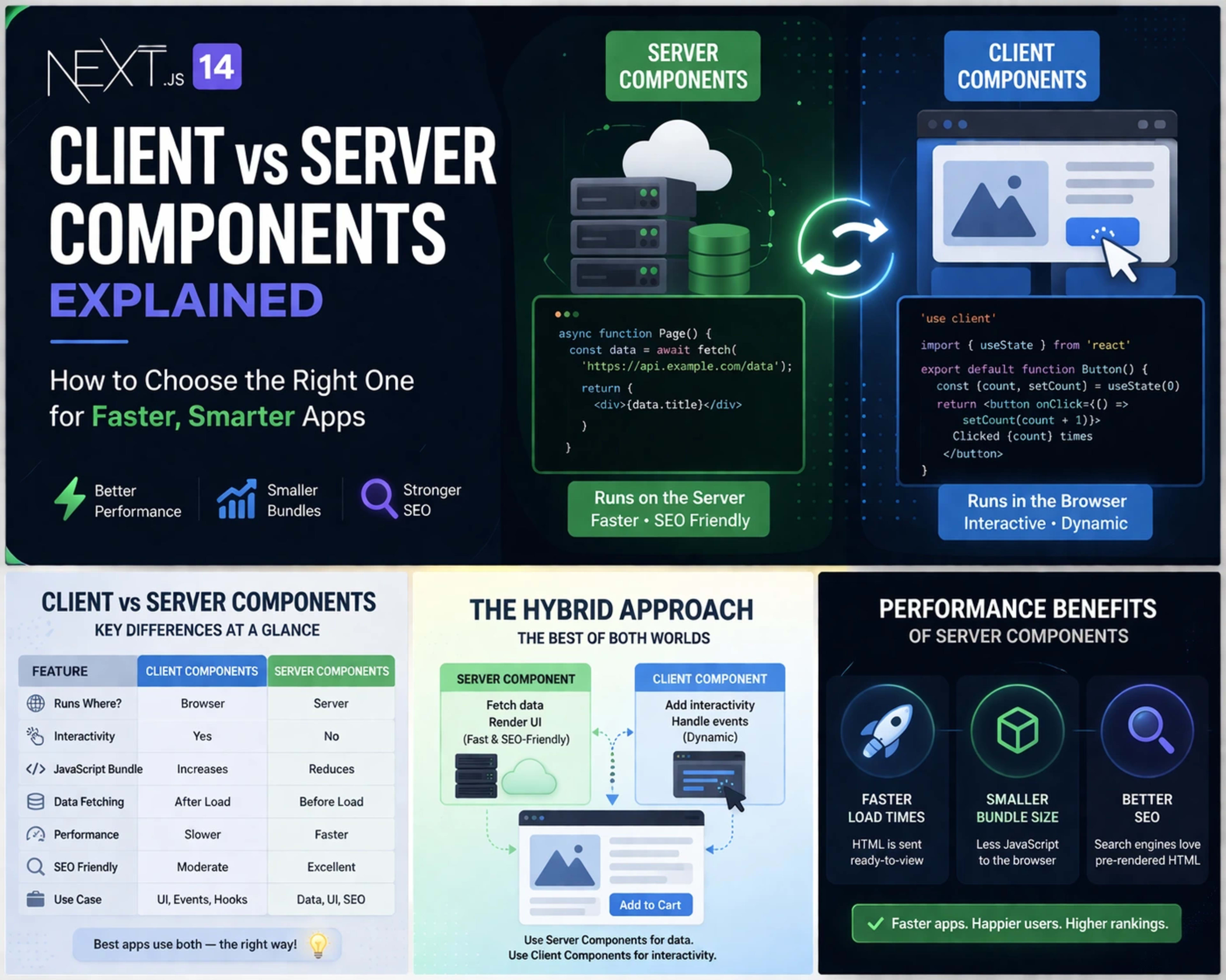
Client vs Server Components: Key Differences
Understanding differences is key in Next.js 14 Explained: How to Choose Between Client and Server Components.
Performance Comparison
Feature | Client Components | Server Components |
|---|---|---|
Speed | Slower | Faster |
Rendering | Browser | Server |
Load Time | Higher | Lower |
Bundle Size Impact
Client Components increase bundle size because they ship JavaScript to the browser.
Server Components reduce bundle size significantly.
Data Fetching Differences
Client → Fetch after page loads
Server → Fetch before sending HTML
How to Choose Between Client and Server Components
Choosing correctly is critical for performance and scalability.
Decision-Making Checklist
Ask yourself:
Does it need user interaction? → Client
Does it fetch data? → Server
Does it require browser APIs? → Client
Common Mistakes Developers Make
Using Client Components everywhere
Ignoring server-side advantages
Overloading the browser with JS
Building Hybrid Applications in Next.js 14
Modern apps combine both component types.
Combining Client and Server Components
You can nest Client Components inside Server Components.
Example structure:
Server Component → Fetch data
Client Component → Handle UI interaction
Real-World Architecture Example
Product page (Server)
Add to cart button (Client)
This hybrid model gives the best of both worlds.
Performance Optimization Tips
Performance is one of the biggest benefits of Next.js 14.
Reducing JavaScript Bundle Size
Prefer Server Components
Avoid unnecessary client logic
Split components wisely
Improving Load Speed
Use streaming
Optimize images
Cache data effectively
SEO Benefits of Server Components
Server Components are great for SEO.
Better Indexing and Faster Rendering
Search engines prefer:
Faster load times
Pre-rendered HTML
This improves rankings significantly.
👉 Learn more about modern rendering strategies here:
https://nextjs.org/docs
Conclusion
Understanding Next.js 14 Explained: How to Choose Between Client and Server Components is essential for modern web development. By choosing the right component type, you can:
Improve performance
Reduce bundle size
Enhance SEO
Build scalable applications
The key takeaway?
👉 Use Server Components by default, and only use Client Components when necessary.