
Introduction to Instagram Collaboration
Instagram has become one of the most powerful platforms for creators and brands. If you're looking to grow faster, learning how to turn on brand collaboration on Instagram is a game-changer.
Instead of working alone, collaborations allow you to partner with others and share content across audiences. This leads to higher reach, better engagement, and stronger credibility.
🌟 Why Instagram Collabs Matter Today
Today’s social media is all about community. When two creators collaborate, they combine audiences and create a stronger impact.
Collabs are especially useful for:
Influencers growing their brand
Businesses promoting products
Content creators expanding reach
📈 Growth Opportunities for Creators and Brands
By using Instagram Collabs:
You double your visibility
You gain trust from new audiences
You increase follower growth organically
📌 What Is an Instagram Collab Post?
An Instagram Collab post is a shared post between two or more users. Unlike tagging, both users are listed as authors.
🔑 Key Features of Collab Posts
Appears on both profiles
Shared likes, comments, and views
Both usernames displayed
One unified engagement system
🔄 Difference Between Tagging and Collaborating
Feature | Tagging | Collaboration |
|---|---|---|
Appears on both profiles | ❌ | ✅ |
Shared engagement | ❌ | ✅ |
Co-author credit | ❌ | ✅ |
⚙️ How to Turn On Brand Collaboration on Instagram
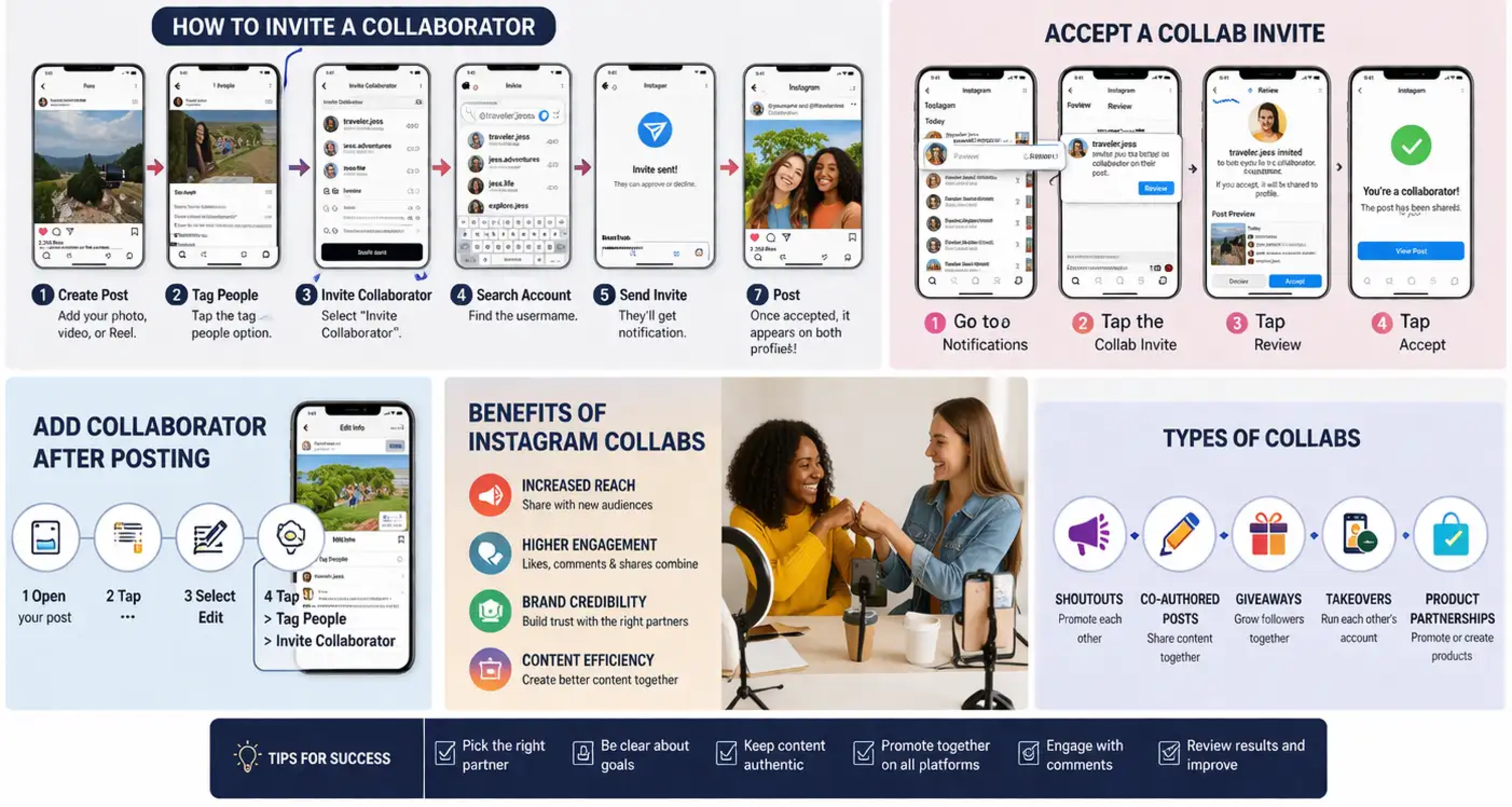
Learning how to turn on brand collaboration on Instagram is simple. Follow these steps:
📲 Step-by-Step Guide to Invite Collaborators
1. Create Your Post
Upload your photo, video, or Reel like you normally would.
2. Tap “Tag People”
While adding your caption, click on the tagging option.
3. Choose “Invite Collaborator”
This option appears inside the tagging section.
4. Search for the Account
Type the username of the person or brand.
5. Send the Invite
They will receive a notification.
6. Publish Your Post
Once accepted, the post appears on both profiles.
✅ How to Accept a Collaboration Invite
If someone invites you to collaborate:
🔔 Notifications and Approval Process
Go to your notifications
Tap the collaboration invite
Select Review
Tap Accept
🎉 What Happens After Accepting
The post shows on your profile
Engagement is shared
You gain visibility instantly
✏️ Can You Add a Collaborator After Posting?
Yes! Instagram allows adding collaborators even after publishing.
🛠️ Editing an Existing Post
Open your post
Tap the three dots (⋯)
Select Edit
Tap Tag People
Choose Invite Collaborator
📩 Approval Process Explained
The collaborator must still accept the request before it appears on their profile.
👥 Who Can Use Instagram Collabs?
🌐 Public vs Private Accounts
Public accounts: Can invite anyone
Private accounts: Can invite followers only
📊 Collaboration Limits and Rules
Up to 5 collaborators allowed
Works for feed posts and Reels only
🔥 Benefits of Instagram Brand Collaboration
📣 Increased Reach
Your content appears on multiple profiles, expanding your audience instantly.
💬 Higher Engagement
All likes and comments are combined, making your post more powerful.
🤝 Brand Credibility
Collaborating with trusted creators builds authority.
⏱️ Content Efficiency
You can share ideas and reduce workload.
🎯 Types of Instagram Collaborations
📢 Shoutouts
Promote each other’s accounts.
📝 Co-Authored Posts
Shared posts with combined engagement.
🎁 Giveaways
Grow followers quickly through contests.
🔄 Takeovers
One creator manages another’s account temporarily.
🛍️ Product Partnerships
Promote or co-create products together.
🔍 How to Find the Right Collaborator
🎯 Audience Matching
Choose someone with a similar niche.
📊 Engagement Over Followers
Focus on interaction, not just numbers.
📩 Outreach Strategies
Send a friendly and clear message explaining your idea.
💡 Tips for Successful Instagram Collaborations
🗂️ Planning and Communication
Set clear goals and timelines.
🎨 Content Authenticity
Keep content natural and relatable.
📢 Promotion Strategy
Promote the post across stories and other platforms.
Common Mistakes to Avoid
Choosing the wrong partner
Poor communication
Making content too promotional
Ignoring audience interests
Not engaging after posting
FAQs About Instagram Collaboration
1. Is Instagram Collab feature available to everyone?
Yes, most users have access, but ensure your app is updated.
2. Can I collaborate with private accounts?
Yes, but they must accept your invite.
3. How many collaborators can I add?
You can add up to 5 collaborators per post.
4. Can I remove a collaborator later?
Yes, you can edit the post and remove them.
5. Does collaboration increase followers?
Yes, it helps you reach new audiences and gain followers.
6. Can I collaborate on Stories?
No, the Collab feature currently works only for feed posts and Reels.
Conclusion
Now that you know how to turn on brand collaboration on Instagram, you can start using this powerful feature to grow faster and smarter. Collaborations help you reach new audiences, build trust, and create better content without extra effort.
Keep your partnerships authentic, choose the right collaborators, and focus on delivering value. When done right, Instagram Collabs can transform your growth journey.
For more details, you can also visit the official Instagram guide here:
👉 https://help.instagram.com/